iShopMaster ERP Edition · The Sovereign Multi-Branch Flagship
ENTERPRISE OPERATING SYSTEM · MULTI-BRANCH GOVERNANCE · DOUBLE-ENTRY GL
Make your entire company follow one operating system. Standardize. Scale. Govern.
Employees should not invent their own workflows. Standardize repair lifecycles, eliminate unauthorized branch pricing, govern stock across multiple locations, and synchronize retail operations with double-entry financials.
Without software-enforced governance, branch operations drift into chaos, stock disappears between locations, and financial visibility collapses.
Rogue Branch Operations
Branch managers giving unauthorized discounts or failing to document customer credit dues. ERP enforces company-wide price controls and supervisor-gated approval limits.
Sloppy Repair Reworks
Technicians rushing jobs, skipping quality checks, and delivering phones that fail within 48 hours. ERP blocks delivery until an authorized inspector stamps a verified QC checklist.
Inter-Branch Blind Stock
Branch A turns away customers while Branch B has 25 screens gathering dust. ERP provides company-wide stock visibility and formal manifests for dispatch and in-transit verification.
FEATURE INVENTORY · 4 PILLARS OF DISCIPLINE
Control, Standardization, Accountability, Scale.
Architectural capabilities engineered to keep multi-branch operations unified under a single standard of excellence.
1. Gated 12-Stage Repair State Machine
Technicians cannot jump stages arbitrarily. Intake → Diagnosing → Waiting Approval → Waiting Parts → Repairing → Quality Check → Ready → Delivered. The server blocks delivery until a verified QC checklist is stamped.
2. Formal Part Request Governance
Technicians do not have free access to warehouse inventory. To replace a battery or screen, they submit a formal `PartRequest`. The storekeeper or branch manager must approve it before stock decrements.
3. Multi-Branch Isolation & Transfers
Operate in HQ Overview Mode or branch-isolated mode. When inventory moves between stores, the system generates a formal `StockTransfer` tracking Dispatch, In-Transit custody, and Receiver Verification.
4. Integrated Double-Entry General Ledger
Every invoice, payment, supplier bill, and stock adjustment creates balanced journal entries (Debit = Credit) mapped to a 4-level Chart of Accounts. Enforce `PeriodLock` to prevent backdated alterations.
5. 7-Layer Enterprise Security Stack
Every request passes Auth → Tenant → License → RBAC → Feature Flag → Quota → Validator. Complete tenant data isolation ensures zero cross-company data leakage.
6. Police Book KYC & Crime Protection
High-risk device intakes automatically force customer National Identity Card (NIC) or Passport image uploads to satisfy local statutory Police Book compliance rules.
REAL ENTERPRISE SCREENS · THE CROWNED FLAGSHIP
See iShopMaster ERP in daily multi-branch action.
Explore actual system screenshots showing multi-branch headquarters governance, gated 12-stage repair machines, spare part requisition custody, and double-entry general ledger.
iShopMaster ERP · Sovereign Executive Walkthrough
EXECUTIVE SALES NARRATION · SUBTITLES · 1080P
Interactive Enterprise Operational Console
Phase 1 of 5
OPERATIONAL PHASE 01 · HQ GOVERNANCE
Headquarters Consolidated Multi-Branch Command Center
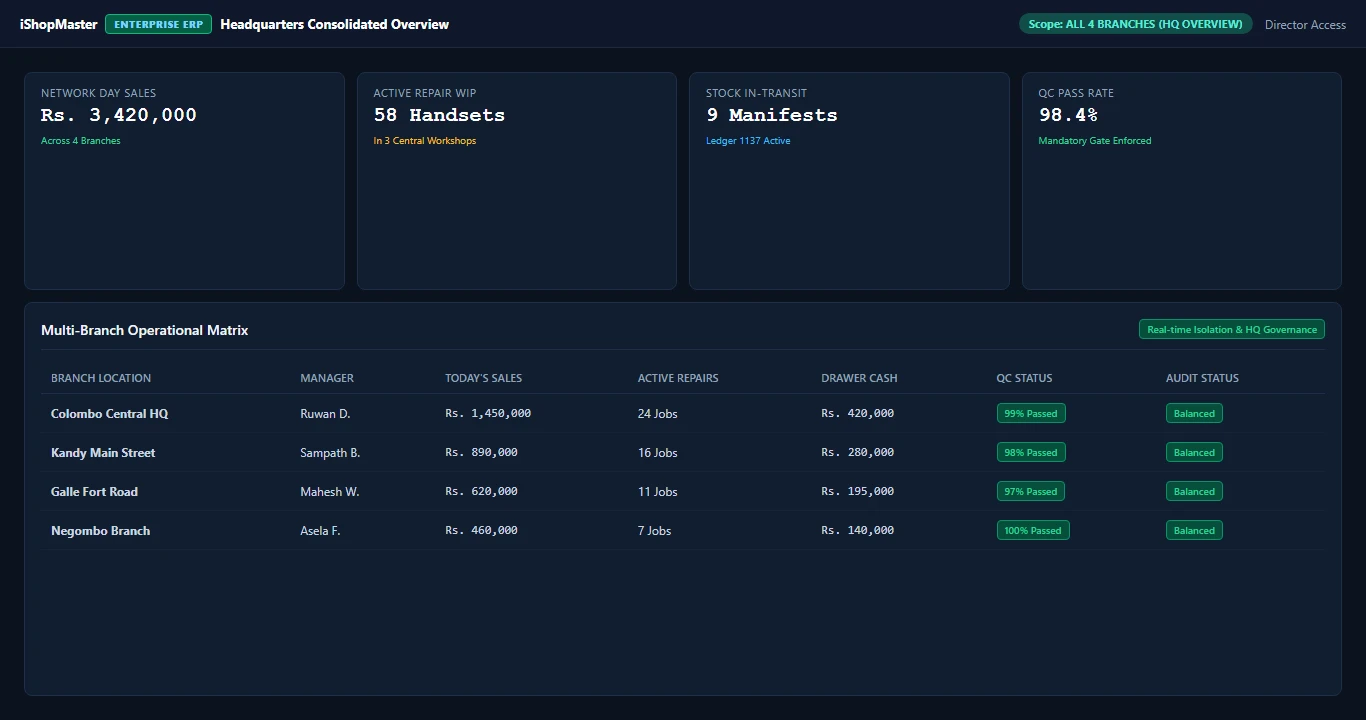
High-profile showroom owners cannot afford blind spots. The Headquarters Overview aggregates retail turnover, cash drawer holdings, and active repair work-in-progress across Colombo HQ, Kandy, Galle, and Negombo without manual spreadsheet consolidation.
Real-time consolidated day sales: Rs. 3,420,000 across 4 branches
Network active repair WIP: 58 handsets across 3 central workshops
Live Stock In-Transit: 9 manifests actively tracked in Ledger 1137
Individual branch drawer cash reconciliation and audit stamps
Read the 5-part executive operational walkthrough outline
00:00 — Headquarters Command Center: Consolidated visibility across all 4 branch stores, tracking day sales (Rs. 3,420,000), cash drawer totals, and active workshop WIP.
00:25 — Gated 12-Stage Repair State Machine: Advance repair ticket. Delivery is physically blocked until a verified QC checklist is signed by the inspection supervisor.
00:45 — Formal Part Requisition: Technicians cannot grab parts freely. A formal PartRequest must be approved by the storekeeper before inventory decrements.
01:05 — Inter-Branch Stock Transfers: Dispatch items from Colombo HQ. Inventory moves to Ledger 1137 In-Transit until Kandy branch scans barcodes on arrival.
01:25 — Double-Entry General Ledger: Inspect balanced journal entries (Debits = Credits) mapped to Level 4 accounts with immutable Accounting Period Locks.
Take a closer look at the actual screens.
Select any screenshot to inspect full-size details.
Headquarters Consolidated Multi-Branch Command Center
Director-level network overview across 4 active branches: monitor consolidated day sales (Rs. 3,420,000), 58 WIP repair handsets, 9 in-transit manifests, and individual branch cash drawer totals in real time.
Gated 12-Stage Repair State Machine & QC Gate
Hard server-enforced lifecycle: technicians cannot skip stages or rush handsets. Customer delivery is physically locked until an authorized senior inspector executes the multi-point Quality Check checklist.
Formal Spare Part Requisition & Storekeeper Gate
Technicians cannot draw warehouse parts freely. Every replacement screen or battery requires a formal digital requisition (REQ-2026-00312) signed off by the storekeeper before inventory decrements.
Inter-Branch Stock Transfer Manifest & In-Transit Custody
Move inventory securely across branch stores: manifest STM-2026-0089 tracks dispatch from Colombo Central Warehouse to Kandy Branch. Stock sits in Ledger 1137 In-Transit until verified by barcode scan on arrival.
Integrated Double-Entry General Ledger & Fiscal Period Lock
Full audit immunity for enterprise CFOs: every sales invoice, repair payment, and stock movement automatically posts balanced debit/credit lines to your 4-level Chart of Accounts with immutable Period Locks.
Ready to standardize your multi-branch enterprise?
Role Segregation Matrix: Strict Operational Discipline.
Ordinary POS software lets any cashier give discounts, adjust stock, or bypass inspection. iShopMaster ERP enforces bank-grade role segregation across your multi-branch network.
Operational Role
POS & Counter
Repair Workshop
Warehouse & Parts
Stock Transfers
General Ledger & GL
Cashier
Quick Pay, Till Init (Locked)
Read-Only Intake
No Access
No Access
No Access
Workshop Technician
No Access
Diagnosis & Labor Hours
Submit Part Request
No Access
No Access
Senior QC Inspector
No Access
Multi-Point QC Pass Stamp
No Access
No Access
No Access
Storekeeper
No Access
View Requested Parts
Approve & Issue Bins
Dispatch & Receive Manifest
Auto-COGS Only
Branch Manager
Shift Close & Till Audit
Estimate Cost Approval
Stock Count Approval
Authorize Branch Outflow
Branch P&L View
Managing Director & CFO
Consolidated Network View
Multi-Workshop Telemetry
Network Valuation
In-Transit Ledger 1137
Period Lock & Tax TIN
PRACTICAL STEP-BY-STEP ENTERPRISE GUIDES
Standard Operating Procedures (SOPs) for iShopMaster ERP.
Standardized workflows for technicians, branch managers, storekeepers, and finance controllers.
SOP 01 · REPAIR GOVERNANCE
How to Progress a Gated 12-Stage Repair Ticket
How workshop technicians progress customer devices through mandatory inspection checkpoints.
Can technicians skip repair stages or bypass quality checks in iShopMaster ERP?+
No. iShopMaster ERP enforces a canonical 12-stage repair state machine. Backend validation strictly blocks technicians from marking a job 'Ready for Collection' unless a verified Quality Check (QC) checklist is submitted and signed by an authorized supervisor.
How does iShopMaster ERP handle stock moving between different branches?+
Inter-branch stock transfers require a formal StockTransfer manifest. Stock transitions through Dispatch, In-Transit custody, and Receiver Verification before entering the destination branch’s available inventory. Stock cannot vanish in transit.
Is the accounting engine a real double-entry general ledger?+
Yes. Every sales invoice, repair payment, supplier GRN, and stock adjustment automatically posts balanced debit and credit journal entries to a hierarchical 4-level Chart of Accounts (Level 4 postable ledgers). Direct balance mutations are strictly forbidden.
What is included in the Rs. 250,000 iShopMaster ERP package?+
The standard iShopMaster ERP package is Rs. 250,000 per year and includes full enterprise deployment for 1 Central Headquarters (HQ) plus 1 Extra Branch (2 locations included). It comes complete with multi-branch database isolation, 12-stage gated repair state machines, storekeeper-approved part requisitions, Ledger 1137 in-transit stock transfers, and double-entry general ledger accounting. Additional branches can be added seamlessly as modular expansions.
A useful next step
Let’s find what fits your shop.
Tell us how you sell, what you repair and where you want to go next.