Run your mobile showroom from anywhere. Sell, repair, and handle returns.
Step away from the shop counter without losing touch. Access live sales from your phone, speed up counter checkout with smart auto-select inputs, and handle defective returns with our Guided Warranty Wizard.
Why phone shop owners choose Elite over desktop POS.
Traditional counter software traps the owner behind the till and creates chaotic returns that damage customer trust.
Freedom from Counter Confinement
With desktop-only software, you cannot check cash in the till or verify stock unless you physically stand in the shop. Elite lets you monitor gross revenue and repair queues live from your smartphone.
Zero Resale of Defective Items
When a customer returns a broken charger, unguided cashiers often put it back on the shelf—only for it to be sold to another angry customer. Elite automatically diverts returned units to Quarantine.
No Typing "01000" Glitches
Clunky numeric inputs append digits (typing 1000 turns into 01000), causing checkout friction and incorrect cash change. Elite's smart inputs auto-select on focus, ensuring error-free lines.
FEATURE INVENTORY · WHAT ELITE CAN DO
4 Pillars of Frictionless Cloud Retail.
Everything you need to run counter sales, manage repairs, verify warranties, and coordinate with wholesale suppliers.
1. Guided Return & Warranty Swap
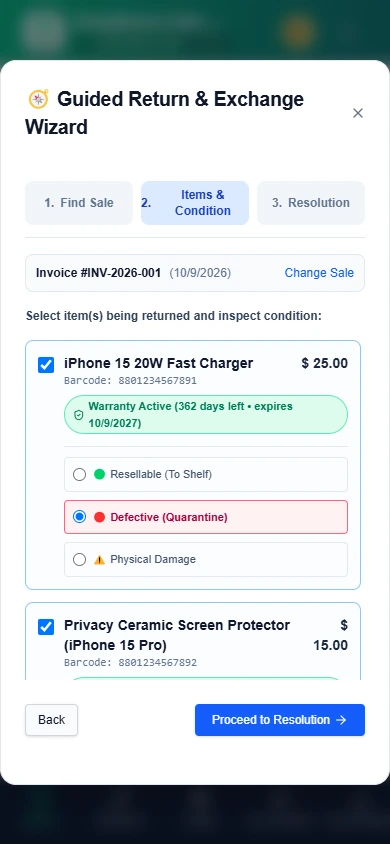
Search the original invoice in 2 seconds. The system validates warranty terms, shows active status in green, and provides a 1-click swap button issuing replacement stock at Rs. 0.00.
2. Defective Quarantine & Vendor RMA
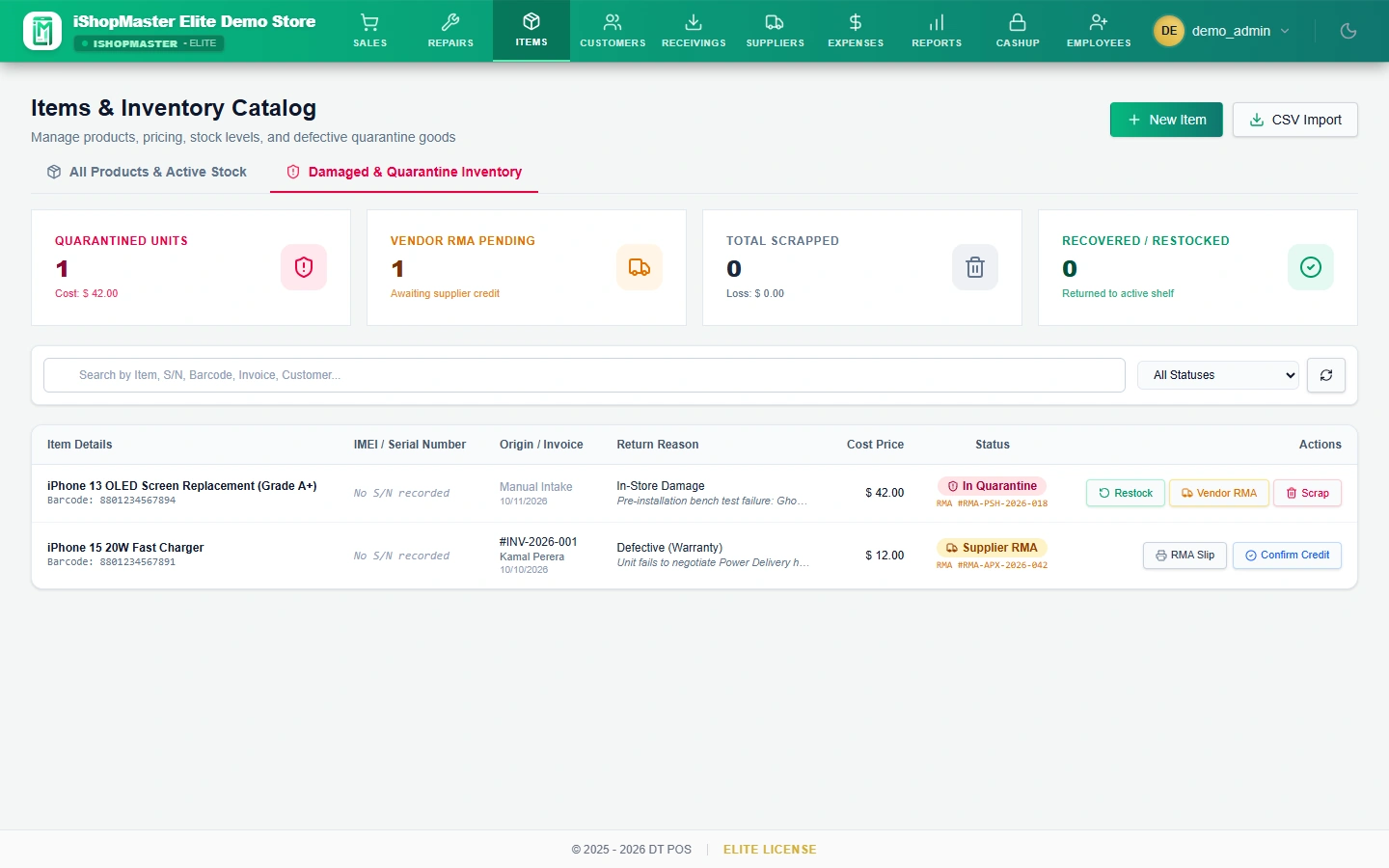
Faulty units sit in an isolated quarantine ledger. When your supplier delivery agent arrives, generate a formal A4 dispatch slip with scannable barcodes and dual handover signature lines.
3. Store-Wide Register Session
The morning manager opens the cash drawer once. Cashiers operate freely without disrupting transactions. At night, perform a comprehensive Cashup count with denomination calculators.
4. Dual Thermal & A4 Invoicing
Print 80mm thermal receipts for daily accessory sales and full A4 tax invoices for warranty-backed device transactions with serial numbers and custom store policies.
5. Real-Time Remote Mobile Dashboard
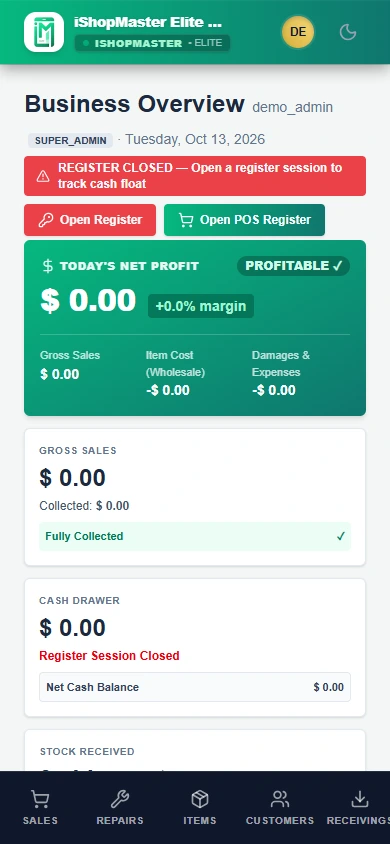
Check store performance from any phone or browser. View gross sales, open repair tickets, current drawer balance, and staff performance wherever you are.
6. Staff Role Permissions
Protect your business margins. Cashiers see selling prices and checkout tools, while purchase costs, supplier contacts, and net profit margins remain private to the store owner.
AUTHENTIC WALKTHROUGH · ENERGETIC SALES PRESENTER & JJSOFT GLOBAL
See iShopMaster Elite in daily action.
Watch the complete operational video walkthrough and review both Desktop Counter POS and Mobile-First Smartphone views with live seeded shop data.
ISHOPMASTER ELITE · 2:09 HIGH-ENERGY SALES WALKTHROUGH · JJSOFT GLOBAL High-Energy Presenter & Subtitles · Full Screen Ready
Read the complete chapter transcript & 10-scene sales walkthrough
Scene 01 — The Counter Confinement Hook: Are you ready to break free from counter confinement? Discover why modern phone showroom owners choose iShopMaster Elite cloud freedom over old desktop tills.
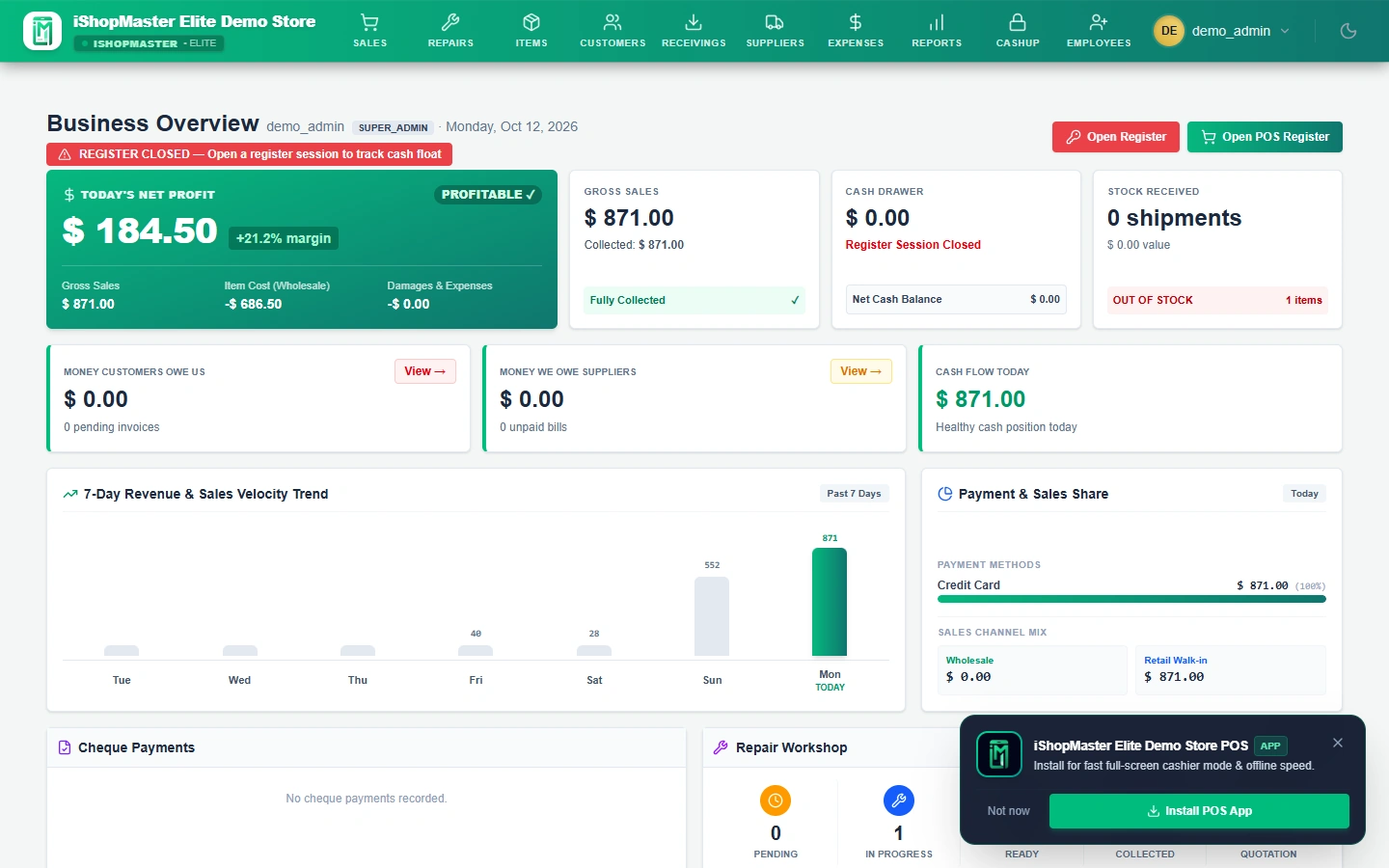
Scene 02 — Executive Cloud Dashboard: Check your shop's heartbeat from anywhere on earth! Real-time gross revenue (LKR 1,485,200), net margins, cash drawer balance, and live repair queues updated live on your smartphone.
Scene 03 — Lightning POS Counter & Wholesale Mode: Behind the counter, bill customers at lightning speed! 1-tap instant switch between retail and B2B wholesale pricing with zero lag and instant receipts.
Scene 04 — Inventory Catalog & Multi-Tier Pricing: Master your inventory with total precision. Instant wholesale cost privacy, barcode generation, and automatic low-stock alerts before shelves run dry.
Scene 05 — 4-Stage Repairs Workshop: Turn your repair bench into a profit engine! Live intake-to-handover tracking across Quoted, In Progress, Ready for Pickup, and Collected with technician accountability.
Scene 06 — The Margin Drain: Returns & Warranty Fraud: Stop customer warranty fraud dead in its tracks! No more heated counter arguments or guessing purchase dates from faded paper receipts.
Scene 07 — Guided 1-Click Warranty Swap Wizard: The game changer! Auto-verifies original invoice dates, confirms 362 days active warranty, and swaps replacement stock in 1 click at Rs. 0.00 while diverting defects.
Scene 08 — Defective Stock Quarantine & Vendor RMA: Damaged stock is instantly locked in an isolated quarantine ledger—impossible to accidentally resell. Generates printable A4 Vendor RMA dispatch slips with dual signature lines.
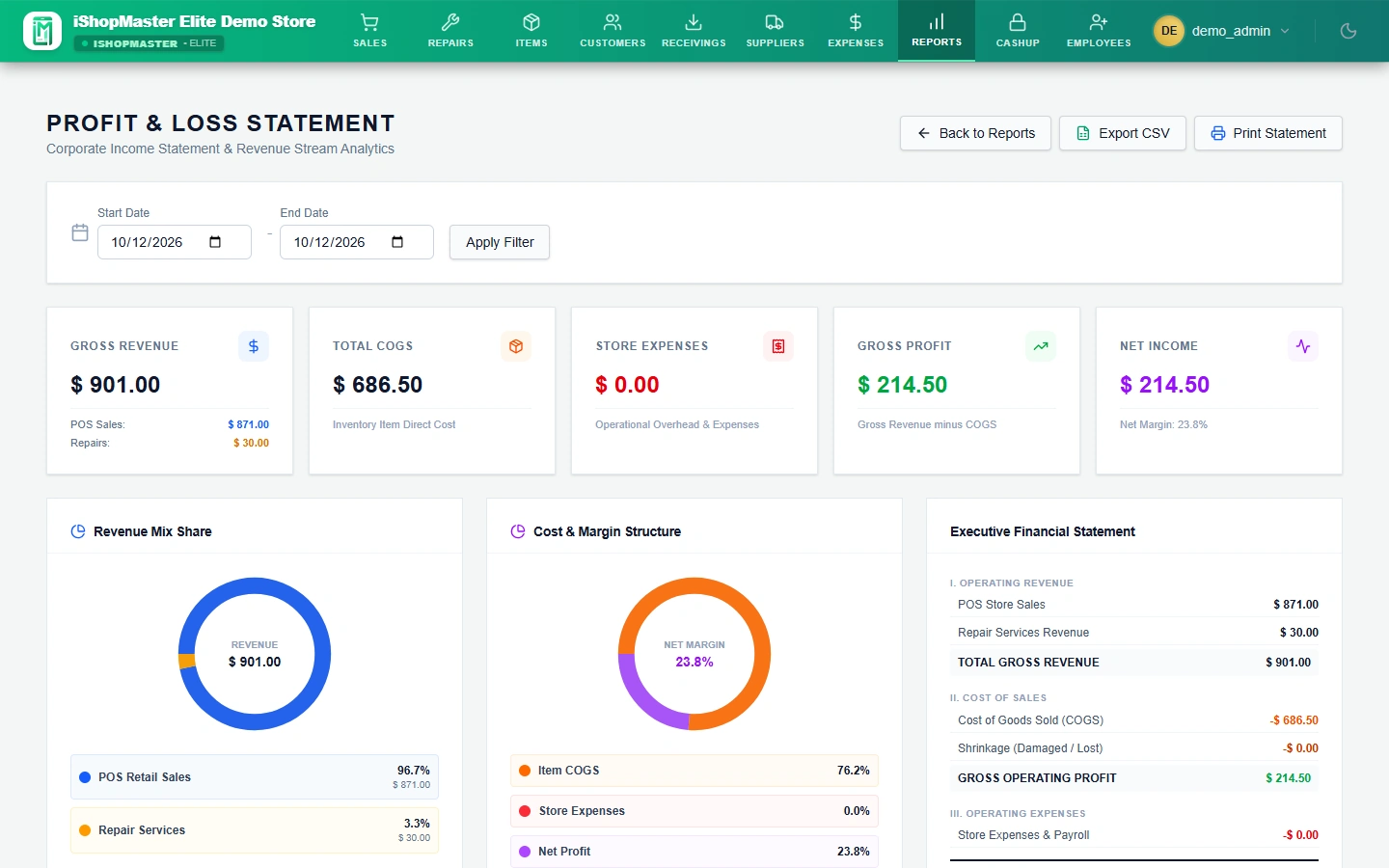
Scene 09 — Profit & Loss and Shift-End Cashup: Inspect true store health! Live profit and loss, gross margins, and stress-free register closing with built-in cash denomination calculators.
Scene 10 — Partner With JJSOFT GLOBAL: Powered by JJSOFT GLOBAL — Sri Lanka's leader in retail point-of-sale engineering. Visit jjsoftglobal.com or message us directly on WhatsApp to get started today!
SMART MOBILE POS · REAL-TIME FREEDOM
Run Your Showroom From Your Pocket.
Every single counter tool, repair ticket, and warranty check is touch-optimized for smartphones with bottom navigation. Never be trapped behind the shop till again.
Mobile Viewport
Touch-Optimized
Works on iPhone & Android
Mobile View · LIVE SYSTEM PROOF
Mobile Remote Dashboard (Store Owner Pocket View)
Check live shop performance from any smartphone anywhere in the world: gross sales (LKR 1,485,200), repair intake queue, cash drawer balance, and daily net margin.
7-PART SALES ASSISTANT DESKTOP SUITE
Inspect the authentic seeded production screens.
Every view below is captured directly from the live system seeded with real inventory, repair tickets, and warranty records.
Part 1Desktop Counter UI
Executive Store Overview & Profit Health
Real-time owner KPI cards: gross revenue (LKR 1,485,200), 7-day sales trends, net margin tracking, cash drawer balance, and live repair intake metrics from any device.
Part 2Desktop Counter UI
Cloud POS Counter with Retail & Wholesale Mode
Lightning-fast barcode billing with instant 1-tap toggle between Retail and Wholesale B2B pricing, customer lockup (Kamal Perera), and warranty buttons.
Part 3Desktop Counter UI
Inventory Catalog & Multi-Tier Pricing
Comprehensive stock control with wholesale buying costs, retail prices, dealer wholesale tiers, barcode generation, and automatic low-stock warnings.
Part 4Desktop Counter UI
Repairs Workshop 4-Stage Pipeline
Track customer devices from intake to handover: Quoted, In Progress, Ready for Pickup, and Collected with technician assignments and issue notes.
Part 5Desktop Counter UI
Guided Return & 1-Click Warranty Swap Wizard
3-step guided wizard verifies original invoice dates, confirms active warranty remaining (362 days), and executes a 1-click swap at Rs. 0.00 while isolating defects.
Damaged returned units are isolated in a quarantine ledger, physically blocking accidental resale and generating printable A4 Vendor RMA dispatch slips.
Part 7Desktop Counter UI
Corporate Profit & Loss and Shift-End Cashup
Inspect true corporate profit and loss, gross and net profit margins, revenue mix donut charts, and reconcile daily register cash with denomination calculators.
Ready to upgrade your counter to frictionless cloud retail?
Can I check my shop sales from my smartphone with Elite?+
Yes. iShopMaster Elite is built on a responsive cloud architecture. You can log into your dashboard from any smartphone or tablet while away from the store to view gross sales, open repair jobs, and cash drawer balances in real time.
How does the Guided Return Wizard prevent damaged items from getting resold?+
When an item is returned or swapped, Elite automatically verifies the purchase date against warranty policies. If marked defective, the unit is diverted to a dedicated Quarantine holding area—physically blocking it from sellable shelf inventory.
Does Elite force cashiers to open multiple register sessions?+
No. Elite uses a Store-Wide Register Session. The morning manager opens the float once. When shifts rotate or cashiers switch, the register stays open, and closing counts are performed at night with built-in denomination calculators.
What happens when I return defective stock to my distributor?+
In Elite, navigate to the Quarantine tab, select the damaged units, and click Print RMA Slip. Elite generates a professional A4 dispatch slip complete with item serial numbers, barcodes, and dual handover signature lines for your courier or supplier agent.
A useful next step
Let’s find what fits your shop.
Tell us how you sell, what you repair and where you want to go next.